Peverholl's Core Functions and Service Capabilities
A detailed look at what Peverholl makes available to users, how each function operates, and what to expect when the system processes your information.
The Functions Peverholl Provides
Structured Data Organisation
The primary function of Peverholl is to take incoming information — whether submitted as an enquiry or supplied as reference material — and arrange it into a consistent, structured format. This means that the same type of information always appears in the same place, using the same field labels and layout conventions.
The benefit of consistent structure is that users spend less time working out how to interpret what they are looking at and more time using the information itself. Peverholl applies this structure automatically, without requiring users to define their own templates or formatting rules.
- Consistent field labels across all record types.
- Category-based arrangement of submitted information.
- Navigable layout suited to both brief and detailed records.
- Structured summaries for multi-part enquiries.


Guided Information Review
Once information has been organised, Peverholl presents it through a review interface that is designed to guide the user's attention appropriately. Rather than showing an undifferentiated list of records, the interface uses visual hierarchy, status indicators, and grouped sections to distinguish what is new, what is pending, and what has already been addressed.
The review interface does not make decisions for the user. It surfaces relevant information in a clear order and provides controls for filtering and navigating between categories. The user retains full responsibility for how they interpret and act on what they see.
- Status indicators distinguishing new, pending, and closed items.
- Visual grouping by category and date.
- Filterable views for large information sets.
- Consistent navigation between related records.
Enquiry Routing and Management
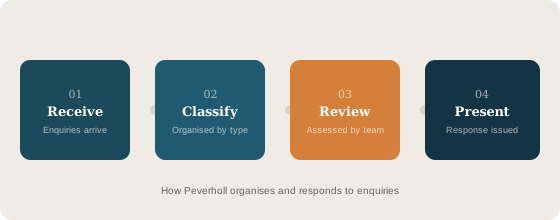
Peverholl includes a built-in process for receiving, categorising, and routing user enquiries to the appropriate team. When a user submits an enquiry through the system, it is immediately classified by type and routed to the team best placed to respond.
This routing function means that general questions, access requests, and specific information queries each reach a different team, rather than entering a single undifferentiated queue. Users are informed when their enquiry has been received and assigned.
- Automatic classification of submitted enquiries by type.
- Routing to relevant team based on category.
- Acknowledgement of receipt provided to the user.
- Escalation path for complex or multi-part enquiries.
How Access to Peverholl Is Arranged
Peverholl is available to users who have submitted an access request and received confirmation from the team. The process is straightforward and involves the following steps.
-
Complete the contact form
Use the form on the Enquiries page to submit your request. Select "Access Request" as the enquiry type and describe your intended use of the system in the message field.
-
Initial review by the team
The team will review your submission. If any additional information is needed, you will be contacted at the email address provided. No access is granted or refused before this initial review is complete.
-
Decision communicated
Once the review is complete, the team will communicate the outcome. If access is made available, you will receive instructions for using the system. If the request cannot be accommodated, the team will explain what alternatives may be available.
-
Ongoing support
Once you have access, the support team remains available for questions about the system, corrections to recorded information, and assistance with enquiry submissions. Use the same contact form to reach the team at any time.
What Peverholl Covers at a Glance
Classification
Incoming information and enquiries are sorted by category before presentation.
Arrangement
Information within each category is ordered by relevance and recency.
Structured display
All records are shown in a consistent, labelled layout regardless of source.
Enquiry routing
Submitted questions and requests reach the right team without manual intervention.
Review interface
A guided view highlights new and pending items while keeping history accessible.
Support access
The support team is available for corrections, clarifications, and follow-up questions.
Have a Question About What Peverholl Can Do?
The support team can answer specific questions about the system's capabilities and whether they are suited to your situation.
Contact the TeamAlso on this site