Peverholl: A Clearer Way to Arrange and Review Digital Information
Peverholl is an intelligent information-organisation system that brings structure to the information your team works with every day. From classifying incoming enquiries to presenting reviewed data in a consistent format, Peverholl is designed to reduce the effort of finding, sorting, and understanding information.

Peverholl provides a single, organised view of the information relevant to your enquiry — without requiring you to navigate multiple sources or interpret unstructured outputs.
What the Peverholl System Addresses
The system is structured around four primary areas of information work. Each area can be used independently or as part of a connected workflow.
Information Classification
Incoming data and enquiries are assigned to relevant categories automatically. This ensures that nothing is lost in a general queue and that each piece of information reaches the appropriate review pathway.
Structured Review
Once classified, information is presented in a standardised format that makes review straightforward. The interface surfaces what is most relevant, rather than presenting a raw data feed.
Enquiry Management
Users can submit and track enquiries through the system. Each submission is acknowledged, categorised, and routed to the appropriate team for assessment and response.
Access Guidance
Peverholl provides clear guidance on what is required to request access to its services. The process is transparent, and users are informed of what to expect at each stage.
From Enquiry to Organised Response
The process Peverholl follows is consistent and transparent. Rather than leaving users to interpret raw data or navigate unstructured information, the system arranges what is available into a clear, reviewable format.
Below is a summary of how Peverholl moves an enquiry from initial submission through to a structured response.
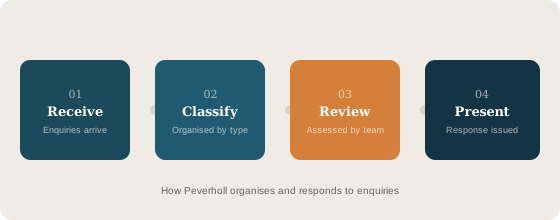
How a Typical Enquiry Moves Through Peverholl
-
Submit your enquiry
Use the contact form on the Enquiries page to send your question, access request, or support query. All required fields are clearly labelled and validated before submission.
-
Automatic classification
Peverholl assigns your enquiry to the relevant category — whether that is a support request, an access query, or a general question about the service — so it reaches the right team.
-
Review by the Peverholl team
A member of the support team assesses the enquiry in context. Where clarification is needed, the team will contact you using the email address provided in your submission.
-
Structured response
You receive a clear, structured reply. If your enquiry relates to access, you will be informed of the next steps without any commitment to a particular outcome.
Explore the Peverholl Documentation
Each section of this site covers a different aspect of how the system is designed and what users can expect when interacting with it.
Ready to Find Out More?
If you have a specific question about Peverholl or would like to request access to the service, the team is available to assist.
Send an Enquiry